Git Basics: What is a diff? And what makes diff mode so powerful?
Tutorials & tips
07 Jun, 2023

This article was last updated on 26 January, 2026.
Here at GitBook, we’ve always believed that a Git-like workflow is at the core of a collaborative process. That’s why we’ve had change requests and diffs in our app for so long. But what is a diff? How do they work in a Git workflow? And what makes them such a powerful collaborative tool?
To answer these questions, here’s a complete guide to diffs — what they are, how they work in GitBook, and why they’re a game changer when it comes to working with your team.
What is a diff?
‘Diff’ is short for ‘difference’, and it describes the way that a tool shows the changes (or differences) between two or more versions of the same file or codebase. Diffs were originally developed in the 1970s as part of the Unix operating system, and today they are used widely in a variety of tools including the likes of GitHub, GitLab and GitBook. In those tools, they’re a key part of what is often called a ‘Git workflow’ — more on that in a moment.
What is diff mode?
Diff mode is a simple, visual way of seeing the differences between two files — or two versions of the same file. When you compare the two versions in diff mode, additions to the file are highlighted with a green +, and anything that’s been removed or deleted has a red -. Other changes, such as an image being updated, will be marked with a blue dot •.
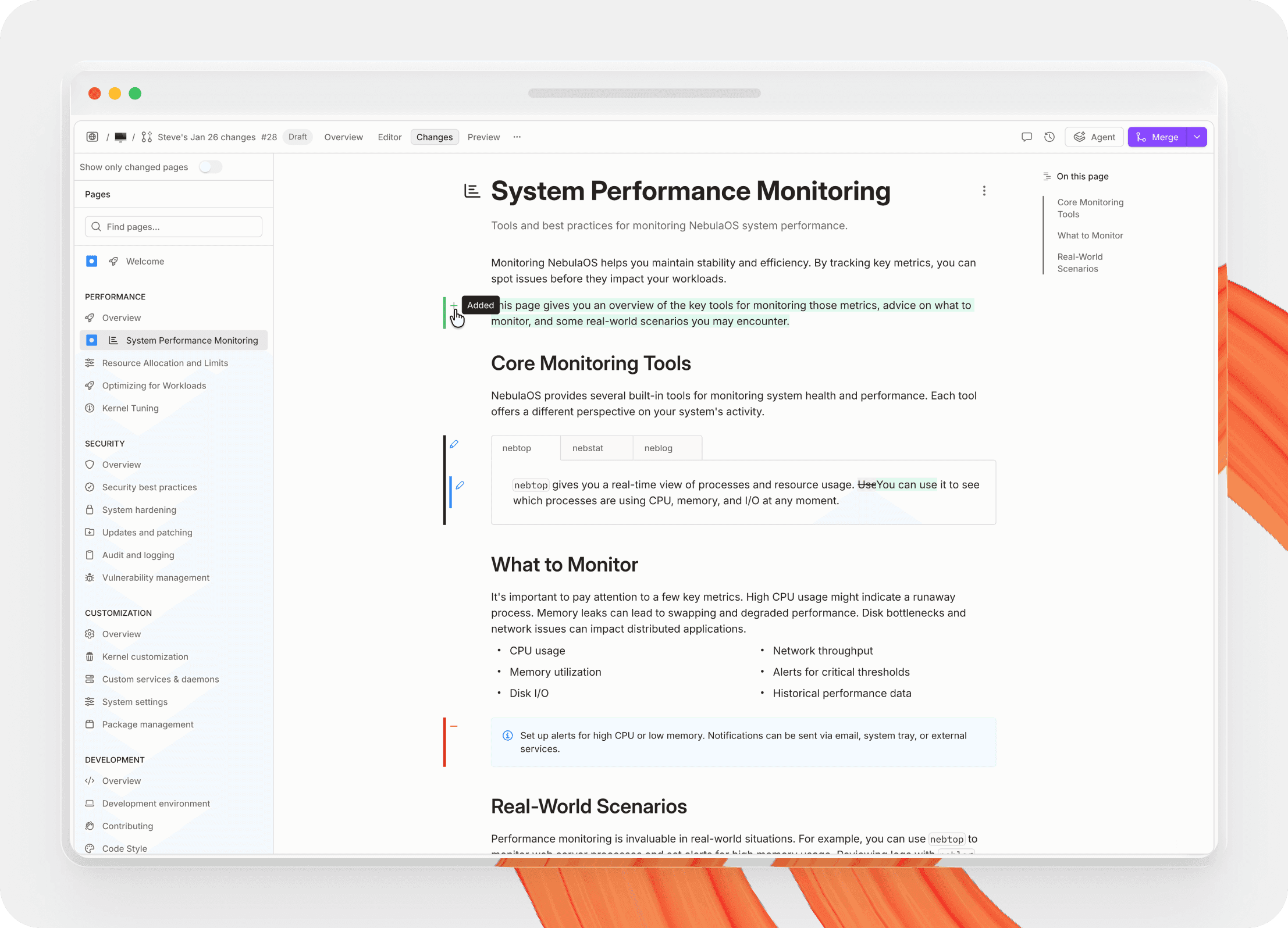
In Git workflows, diff mode will typically show the changes that you or someone else has made to a document, comparing it to the main version. In these Git environments, you cannot directly edit the ‘main’ files themselves. Instead, you create a ‘branch’ — a copy of the main file at that moment in time — and then make edits within that branch.
When you or someone else wants to check over your changes, you can compare this branch to the main version of the file — with diff mode quickly and easily showing them what you’ve added, removed or changed. Once everyone is happy, you can ‘merge’ that branch in to the main version of the file, updating that primary version with all your changes.
Why does GitBook have diff mode, and how do they work?
GitBook is an AI-native documentation platform designed to make creating and publishing technical documentation easy. And because it uses the same branch-based workflow as GitHub and GitLab, it also includes diff mode to check changes before merging.
The branch-based workflow not only means teams could avoid accidentally publishing something incorrect without checks. It also encourages collaboration — which is essential when you want everyone to contribute their own technical knowledge to your central knowledge hub.
That’s why, in GitBook, you cannot directly edit a published page in real-time. Instead, you can edit in a ‘change request’ — which creates a new branch — and then make edits within that branch. You can either make all your changes in one go, or make a few edits, then leave your change request and return to it later.
Once you’re happy with your changes, you can submit your changes for a review from someone in your team. They can jump straight into your change request, and use diff mode to instantly see which pages you’ve made changes in. On individual pages, diff mode shows the specific blocks that you’ve added, edited or removed.
What makes diff mode so useful in GitBook?
Diff mode makes reviewing changes super simple, as you can quickly see the sections someone has edited and focus purely on them, rather than having to check everything on the page to make sure it’s all correct. It’s also great if someone deletes something accidentally — without seeing the deleted block highlighted in red, you may not notice that it was missing during a review.
Combine this with feedback through comments and the option to have GitBook Agent improve or review your work before you merge, and you’ll see the true power of change requests. By involving others in your workflow, you can expand the knowledge within your pages, making your technical documentation better than ever.
At GitBook we always want to give you the best experience when sharing knowledge and publishing technical documentation alongside your team. We believe a change request workflow is at the core of that collaborative process — we think it’s the best way to work. And diff mode is a big part of that.
Why GitBook is a great platform for documentation
When it comes to creating great documentation, diff mode is just one part of the bigger picture. It works best when it’s paired with a workflow built for collaboration.
GitBook brings Git-style reviews to documentation, with an unbeatable WYSIWYG editing experience. You get the control engineers expect, with an intuitive visual interface for everyone else.
Here’s why GitBook is the ultimate docs platform:
Intuitive visual editor – Write and structure docs fast, with Markdown support and block-based editing that’s instantly familiar.
Git Sync – Keep docs and code in sync, so engineers can contribute to docs in GitHub or GitLab, while others edit visually.
AI Assistant in your published docs – Give readers instant, source-backed answers from your content. You can even embed the AI Assistant in your product or website.
GitBook Agent – Get help drafting, maintaining, and reviewing changes, so docs stay consistent and high quality.
Want to join teams like Zoom, FedEx, Amazon and Nvidia and build great next gen docs? Get started with GitBook for free or get a demo today.
→ Get started with GitBook for free
→ See what GitBook Agent can do
Authored by

Latest blog posts
Get the GitBook newsletter
Get the latest product news, useful resources and more in your inbox. 130k+ people read it every month.



Accurate docs. Better answers.
Your docs are already feeding AI. Are users getting the right answers or the wrong ones?
Accurate docs. Better answers.
Your docs are already feeding AI. Are users getting the right answers or the wrong ones?
Accurate docs. Better answers.
Your docs are already feeding AI. Are users getting the right answers or the wrong ones?
Product
Create & Publish
Solutions
Resources

© 2026 Copyright GitBook INC.
440 N Barranca Ave #7171, Covina, CA 91723, USA. EIN: 320502699
Get an AI summary




The State of Docs Report 2026
State of Docs brings together insights from documentation experts from across the industry
Product
Create & Publish
Solutions
Resources
© 2026 Copyright GitBook INC.
440 N Barranca Ave #7171, Covina, CA 91723, USA. EIN: 320502699
Get an AI summary
The State of Docs Report 2026
State of Docs brings together insights from documentation experts from across the industry

Product
Create & Publish
Solutions
Resources
© 2026 Copyright GitBook INC.
440 N Barranca Ave #7171, Covina, CA 91723, USA. EIN: 320502699
Get an AI summary
The State of Docs Report 2026
State of Docs brings together insights from documentation experts from across the industry